
Microsoft 3D Builder has been removed from the Windows app store once again, and while the page still exists, the download button doesn’t work. Originally pre-installed on the early Windows 10 operating systems, this valuable 3D printing tool is no longer included in newer releases. However, there’s still a reliable way to get it running on any modern Windows 10 or Windows 11 machine.
What is Microsoft 3D Builder?
Microsoft 3D Builder is free 3D modeling and printing software that allows users to create, modify and prepare 3D files. Although it has been dropped from the store and no longer receives updates, it remains one of the most user-friendly tools available for Windows users.

Why Download 3D Builder in 2025?
After years of 3D printing and trying dozens of different applications, I still consider 3D Builder the best choice for specific tasks. The split tool alone is worth the installation – perfect for breaking large objects into smaller printable parts, and far easier to use than most CAD packages. Here’s a few other reasons to consider using it:
- Completely free without limitations
- Powerful model repair and fixing tools
- Advanced features including split and merge functions
- Intuitive basic modeling capabilities
- Native Windows integration
- Minimal system requirements
- STL and 3MF file compatibility
- Direct 3D printer support
System Requirements
Before starting the installation, ensure your system meets these requirements:
- Windows 10 or 11 (32-bit or 64-bit)
- Administrator access
- 75MB available storage space
- Active internet connection
Download and Installation Guide
Method 1: Quick Download (Recommended)
For convenience sake, I’ve packaged all of the necessary files together. This download includes the components we need for installation, pre-organized to keep things nice and simple.
Download 3D Builder Complete Package
Method 2: Manual Download from Microsoft
If you prefer to download these installers directly from the Microsoft servers:
- Visit RG Adguard (Microsoft’s package download portal)
- Enter this URL:
https://apps.microsoft.com/detail/9wzdncrfj3t6 - Select “Retail” from the dropdown menu
- Click the check mark icon
- Download these three files in order:
- Kinect package
Microsoft.WindowsPreview.Kinect.8.1_2.0.1410.19000_x64__8wekyb3d8bbwe.appx - VCLibs package
Microsoft.VCLibs.120.00_12.0.21005.1_x64__8wekyb3d8bbwe.Appx - 3D Builder app bundle
Microsoft.3DBuilder_2015.209.2327.4143_neutral_~_8wekyb3d8bbwe.appxbundle
- Kinect package
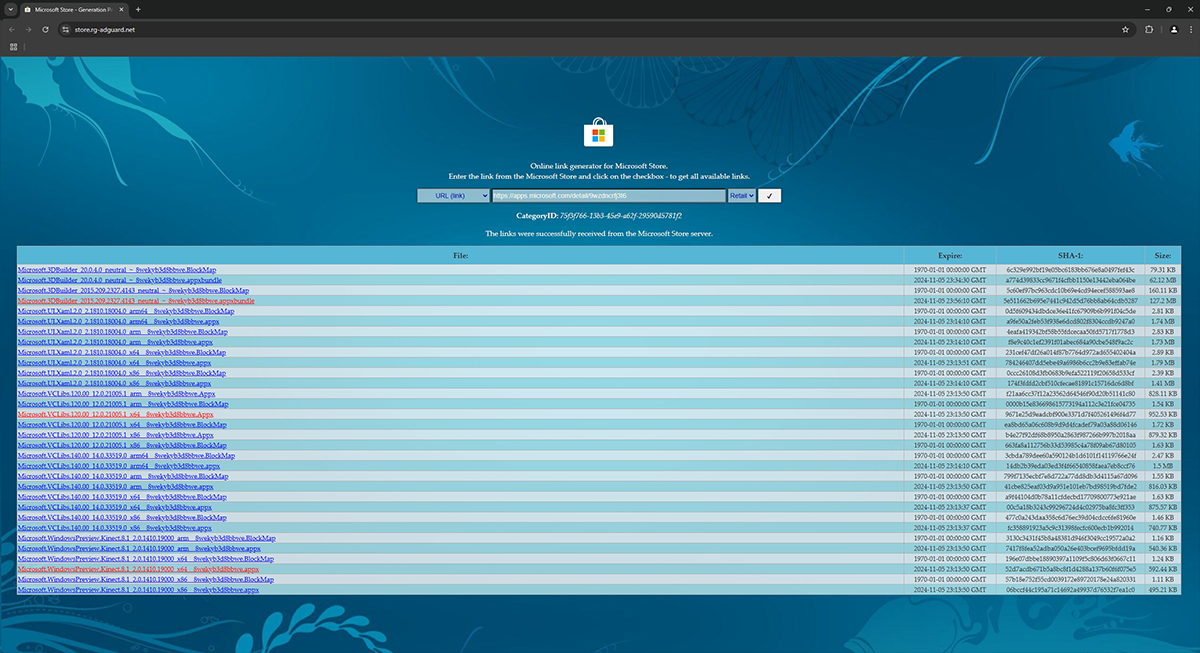
Installation Steps
With these packages copied to your Windows PC, we’ll go ahead and install them in the same order. Navigate to the downloads folder, or wherever these files are located and follow this sequence:
- Install the Kinect package:
- Run Kinect .appx file
- Click the “Install” button when prompted
- Wait for completion
- Install VCLibs package:
- Run the VCLibs .Appx file
- Click the “Install” button when prompted
- Wait for completion
- Install 3D Builder package:
- Run the 3D Builder .appxbundle file
- Click the “Install” button when prompted
- Wait for completion
Troubleshooting Common Issues
Installation Errors
- Error 0x80073CF9: Run the installation as administrator
- Missing dependencies: Verify that all three files are installed in order
- Access denied: Check Windows defender settings
Post-Installation Tips
- Update Windows if 3D Builder won’t launch
- Check Windows Store apps permissions
Conclusion
Though Microsoft has dropped 3D Builder from the app store, this installation method provides full access to this fantastic tool. While the process requires a few extra steps, the result is a fully functional version of one of the best free 3D modeling tools available for Windows.
Last Updated: January 2025
Saved and downloaded for the future. Thanks for doing this! I’ll be watching this article for any future changes.
I installed the app and it started automatically. But 3D Builder cannot be found on the desktop. Where is the exe file?
Best regards Harry
Hi Harry,
Mine is installed in C:\Program Files\WindowsApps. If you’re having trouble locating it, open the Task Manager (ctrl + r, type in ‘taskmgr’) and find the 3D Builder process in the list. Right click it and go to properties to see the installation path.
-Brett
Please add This back to the Microsoft store and continue to develop it and offer it to us. There are so many uses for this product. I am actually surprised that you removed it. You have to put it back and popularize it more. This was a very unknown application that most users had no idea it was available. This is very unfair to users and to your development team who obviously put lots of work and effort in to this.
3D Builder is very useful for 3d printing – repairing imported models, and very easy to learn for creating your own models.
For modelling complex shapes its only major fault is it tends to add random vertices when merging parts together. The problem for FDM printing is when the model won’t sit flat on the printer bed.
So instead I export my ungrouped assembly of parts as an .obj from 3DBuilder into MeshLab, a free open-source 3D app to do the merge: Filters -> mesh layer -> flatten visible layers. Also useful is Filters -> cleaning and repairing -> merge close vertices.
Then I re-import the merged .obj back into 3DBuilder allowing it first to repair the merged model, then save it as .stl
It’s funny to me… Microsoft bought a very powerful 3D package but dropped it for this. Truespace was a powerhouse, 3D builder can’t do anything compared to it. If it wasn’t for the file conversion, I would stick to Truespace to do it all…
In any case, Thank you very much for this!
Thanks a lot! You saved me lots of time energy and money!
Wow it downloaded. Then I went in the zip folder, selected all 3 and clicked open. Then one by one they installed. Thank you so much
Hi Brandon,
You’re most welcome. I’m glad it helped!
Thank you so much for this, I was going to re-install Windows 10 on an older PC and try to just copy it over but this was so effortless and pain free.
Hi Richard,
You’re welcome! No idea why Microsoft removed it in the first place, but glad I was able to spare you the hassle.
This is not the original 3d builder that you can add shapes and edit stuff.
This only opens a library and let you pay for prints. :)
Never mind! I just did the same but with the older version in that repository and worked Thanks
Thank You, Thank you, Thank you so much! I’m a bit older and trying to avoid the steep learning curve that comes with other software. Now I can enjoy this with Windows 11. You made me a happy man. Greetngs ftom the Netherlands!
Well done.
It works fine.
Dank je wel voor al je werk
thanks
“Visit RG Adguard (Microsoft’s package download portal)”
Couple things
* that “RG Adguard” site is not Microsoft owned
* rg-adguard.net domain is registered with russian registrator http://www.reg.ru, I’ve checked it with ICANN
Hi Dmitry,
You’re correct! That was poor wording on my part. However, RG Adguard is generally a trusted resource. The download links are safe and come from the official Microsoft servers, and MVPs on https://learn.microsoft.com often suggest it.
hi, die app starts but ist will not recognice my kinect V2. In the KinectV2ConfigurationVerifier the Kinect runs perfectly.
Unfortunately I am not sure. I’ve never used a Kinect with 3D Builder, although it looks like there is a tutorial on Microsoft’s website that you could check out. They seem to be using a similar version to the one I’ve shared here, but I will see if I can find any more information!
Just wanted to leave a comment thanks for making this available/easy to get!